Author: Ranjit Parmar

  • From WordPress Content to a Portal-Ready XML Feed

    Case Study: WordPress to Custom XML Feed

    The Problem

    The client had a WordPress website containing structured content that needed to be distributed to a third-party platform.

    The standard WordPress RSS feed did not contain all of the information required by the receiving platform. Important custom fields, images, URLs, categories, and other structured data needed to be mapped into a specific XML format.

    The client needed a feed that was:

    • Generated automatically from WordPress
    • Compatible with the receiving platform’s XML specification
    • Able to include custom WordPress fields
    • Properly formatted and encoded
    • Accessible through a dedicated XML URL
    • Reliable enough for regular automated consumption

    The Solution

    We developed a custom WordPress XML feed specifically around the client’s data structure and the requirements of the receiving platform.

    The implementation included:

    1. WordPress Data Mapping

    Relevant WordPress fields were mapped to the required XML elements, including standard post data and custom fields.

    2. Custom XML Structure

    Instead of relying on the default WordPress RSS format, a dedicated XML structure was generated according to the target platform’s requirements.

    3. Image Handling

    Featured images and other required image information were resolved and included in the appropriate XML elements.

    4. Data Formatting

    Dates, URLs, text fields, categories, and other values were formatted correctly for XML output.

    5. XML Validation

    The generated feed was checked for structural and formatting problems to ensure that it could be successfully parsed by the receiving system.

    6. Automatic Generation

    The feed remained connected to the WordPress database, so updates to the website could be reflected in the XML feed without manually creating or editing XML files.

    The Result

    The client received a dedicated, automatically generated XML feed that transformed their existing WordPress content into the format required by the external platform.

    The final solution provided:

    • ✅ Custom WordPress-to-XML data mapping
    • ✅ Support for custom fields
    • ✅ Image support
    • ✅ Structured XML output
    • ✅ Automated feed generation
    • ✅ XML validation
    • ✅ A dedicated feed endpoint

    Key Takeaway

    A standard WordPress RSS feed is not always enough when another platform requires a specific XML structure.

    A custom feed allows the existing WordPress website to become a reliable data source without requiring the client to manually maintain a separate XML file.

    Need a custom XML feed from WordPress?

    Send us your WordPress website, existing feed, or target XML specification and we’ll help determine the right feed structure.

    Before: WordPress posts + ACF/custom fields
    ↓
    Feed Generator: Custom mapping + image resolver + XML builder
    ↓
    After: Validated portal-ready XML feed

  • When Working From Home Looks Like Doing Nothing

    Working from home is often presented as a modern advantage: no commute, greater flexibility, more time with family, and the freedom to organize your own schedule.

    But there is another side to working from home that is rarely discussed.

    Sometimes, the people closest to you are the ones who understand it the least.

    I learned this in a painful way when I realized that my father had become convinced that I was simply sleeping or relaxing at home all day.

    The irony was that I was not working less. In many periods, I was working more.

    The Invisible Nature of Remote Work

    One of the biggest problems with working from home is that the work itself becomes invisible.

    When someone leaves home in the morning, travels to an office, spends eight or ten hours there, and returns in the evening, everyone understands the basic story:

    He went to work.

    There is a physical place associated with the work.

    There are colleagues.

    There is a desk.

    There are meetings.

    There is a visible separation between “work time” and “home time.”

    A person working from home has none of those visible signals.

    If you are sitting at your computer at 10 in the morning, someone may see you as “being at home.”

    If you are still working at 11 at night, they may simply see you as someone who happens to be using a computer.

    The actual work—problem solving, communication, debugging, planning, documentation, testing, dealing with clients, meeting deadlines—is mostly invisible.

    And invisible work is surprisingly easy to undervalue.

    When Your Own Family Misunderstands Your Work

    What makes this particularly difficult is when the misunderstanding comes from the people you love the most.

    In my case, my father became convinced that I was spending my days sleeping rather than working.

    That belief did not come from nowhere.

    It was shaped by what he heard and understood from people around me—my wife and relatives, people I love and care about deeply.

    That is what made the situation difficult.

    I don’t believe they were deliberately trying to diminish my work.

    From the outside, working from home can genuinely look very different from traditional employment.

    There is no office building to point to.

    There is no manager physically watching the work.

    There is no commute proving that you have “gone to work.”

    And there may be no obvious physical evidence of what you accomplished that day.

    The result is a strange situation:

    You can be working extremely hard while appearing to be doing almost nothing.

    The Productivity Paradox

    Remote work has a peculiar paradox.

    The better you become at organizing your work, the less visible the effort may become.

    A freelancer or remote professional may spend hours solving a problem that eventually produces only a few lines of code.

    A client may see the final feature, but not the hours spent understanding the requirement, researching the problem, testing different approaches, fixing unexpected issues, documenting the solution, and testing it again.

    Similarly, a person may spend an entire day dealing with difficult technical problems and finish the day without anything visually impressive to show.

    The computer screen looks almost exactly the same.

    But the person has moved the project forward significantly.

    This is particularly true in technical work.

    Writing code is often the smallest part of the job.

    Understanding a system, diagnosing failures, designing architecture, testing edge cases, communicating with clients, maintaining existing systems, and taking responsibility for the final result can consume far more time than simply typing code.

    Yet none of that is visible from the outside.

    The Emotional Cost

    Being misunderstood by strangers is one thing.

    Being misunderstood by your own family is different.

    When people you love believe that you are not working seriously, it can slowly affect how you see your own work.

    You may begin feeling that you have to constantly prove that you are working.

    You may feel guilty when you take a break, even though breaks are normal.

    You may hesitate to spend time with your children because you feel that someone might interpret it as evidence that you are not working.

    You may continue working late simply because you feel that the visible appearance of “being busy” is necessary.

    And eventually, something that was supposed to provide flexibility can become another source of pressure.

    This is one of the hidden problems of working from home:

    You are not only managing your work. You are also managing other people’s perception of your work.

    Family Often Measures Effort by Visibility

    Perhaps the deeper lesson is that families often measure effort through visible sacrifice.

    Someone leaving home early every morning appears disciplined.

    Someone returning late appears hardworking.

    Someone sitting at home behind a laptop does not necessarily receive the same recognition—even if that person is working just as hard.

    This is not necessarily because people are unfair.

    It is because humans naturally use visible signals to judge invisible activity.

    The problem is that remote work removes many of those signals.

    A person can work for ten hours and still appear available.

    That availability can create another misunderstanding:

    “If you are home, you must be free.”

    But being physically present is not the same as being mentally available.

    The People We Love Can Hurt Us Without Intending To

    There is another uncomfortable realization in this experience.

    Sometimes the people who contribute to our biggest misunderstandings are not our enemies.

    They are the people we love.

    My father was not trying to insult my profession.

    My wife and relatives were not necessarily trying to undermine me.

    They were interpreting what they could see.

    And what they could see was very different from what I was actually experiencing.

    That distinction matters.

    It is easy to become angry and say, “They don’t understand how hard I work.”

    But a more useful question is:

    Why is my work so difficult for them to see?

    That question leads to a better conversation.

    What Remote Professionals Can Learn

    My experience has taught me that remote workers should not assume that their families automatically understand what they do.

    We may think our work is obvious because we live it every day.

    It isn’t.

    Sometimes we need to explain it.

    Not defensively.

    Not by listing every hour we worked.

    But by helping people understand what actually happens behind the screen.

    Instead of saying, “I work all day,” explain what that work means.

    “I have a client deadline.”

    “I need to diagnose this technical problem.”

    “I have testing to complete.”

    “I have to deliver this feature today.”

    “I have a meeting at this time.”

    These small explanations can make invisible work more visible.

    Working From Home Is Still Work

    The location of work does not determine its value.

    A person can work from an office and be unproductive.

    A person can work from a bedroom, living room, or home office and build something valuable.

    The important question should not be:

    “Where are you working?”

    It should be:

    “What are you accomplishing?”

    For freelancers and remote professionals, the answer may not always be immediately visible.

    But that does not make the work less real.

    A Personal Conclusion

    I don’t want this experience to become a complaint about my father, my wife, or my relatives.

    They are people I love and care about.

    Instead, I see it as a lesson about how easily invisible work can be misunderstood—even by the people closest to us.

    Perhaps my father seeing me at home and thinking I was sleeping was, in its own way, a reminder of just how invisible my work had become.

    I had spent years building a career around a computer.

    My workplace had become my home.

    My colleagues were often on the other side of a screen.

    My clients were in different places.

    My workday did not always have a clear beginning or end.

    And the results of my work often existed only as code, files, emails, systems, and completed projects.

    There was no office door to close at the end of the day.

    There was no uniform, factory, shop, or desk that announced:

    “This person is working.”

    So perhaps the real challenge of working from home is not productivity.

    It is visibility.

    And perhaps one of the most important things remote workers can learn is this:

    Your work does not become less valuable simply because other people cannot see the effort behind it.

    Sometimes, you have to trust the value of what you are doing—even when the people you love do not fully understand it yet.
  • How a Client Got a Full Refund Six Months After an Order Was Completed — And What I Learned

    As a freelancer, one of the hardest lessons to learn is that finishing a project does not always mean the project is truly finished.

    I recently experienced a situation where a client received a completed project, the order was accepted, and the original scope had effectively been delivered. Months later, however, the client requested significant changes to the project.

    What followed eventually resulted in a full refund of the original order amount — approximately six months after the order had been completed.

    This experience changed the way I think about project scope, revisions, acceptance, documentation, and what freelancers should do when a client wants to fundamentally change an already completed project.

    The project was completed

    The project originally had a defined scope and price.

    I completed the work according to that scope, delivered the agreed functionality, and the client accepted the order.

    At that point, from a normal freelance-project perspective, the transaction should have been closed.

    The important lesson here is that an accepted order creates a psychological sense of finality, but freelancers should not assume that the risk has completely disappeared.

    I now believe that completion and acceptance are only one part of protecting yourself.

    The other part is maintaining a clear record of:

    • What was originally requested
    • What was actually delivered
    • What the client approved
    • What revisions were included
    • What changed later
    • When those changes were requested
    • Whether the new request materially changed the architecture or workload

    Then the requirements changed

    Several months after the original order was completed, the client requested a major change.

    This was not simply a small correction or a minor bug fix.

    The requested change affected the underlying way the system obtained and processed its data.

    Initially, I treated the request as a goodwill gesture rather than immediately treating it as a completely new project.

    That decision is something I have thought about a lot since then.

    As a freelancer, it is natural to want to help a long-term client.

    You think:

    “I already know the project. I’ll take care of this small change.”

    The problem is that something that looks small from the client’s perspective can become a completely different engineering problem.

    A change in the data source, architecture, workflow, validation requirements, or external dependencies can have consequences throughout the entire system.

    What starts as “just change the source” can become:

    new ingestion → new parsing → new normalization → new caching → new testing → new diagnostics → new failure handling → new documentation → new acceptance criteria.

    At that point, it is no longer simply a revision.

    It is a new engineering phase.

    The hidden cost of saying “I’ll do it for free”

    This was probably the biggest lesson for me.

    When I agreed to look into the change without immediately charging a new project fee, I intended to provide good customer service.

    Instead, I gradually became responsible for work that was significantly larger than the original request.

    The more I investigated the new requirements, the more complexity became visible.

    There were new technical questions, testing requirements, external-source issues, diagnostics, caching considerations, and additional acceptance expectations.

    The amount of engineering effort grew substantially.

    And this created an uncomfortable situation:

    The client viewed the work as a continuation of the original project.

    I increasingly viewed it as a materially different project.

    That difference in perception is dangerous.

    The most important lesson: define “change” before doing it

    A freelancer should not ask only:

    “Can I technically make this change?”

    The more important question is:

    “Does this change remain inside the original commercial scope?”

    Those are two completely different questions.

    A technically possible change can still be commercially outside the original agreement.

    For example, these may look like minor requests:

    • “Use another source.”
    • “Change the input format.”
    • “Add another validation layer.”
    • “Make it work with this external service.”
    • “Add comprehensive unit testing.”
    • “Add diagnostics.”
    • “Provide evidence for every component.”
    • “Change the architecture.”

    But each can potentially create substantial additional work.

    The freelancer has to identify that boundary early.

    Six months changes the situation — but does not eliminate risk

    One of the most surprising parts of this experience was the timing.

    The original order had been completed approximately six months earlier.

    From the freelancer’s perspective, the project was old.

    From the client’s perspective, however, the client was still looking at the overall project and raising concerns about what they believed remained incomplete.

    That taught me something important:

    Time alone does not protect a freelancer from a scope dispute. Documentation does.

    A freelancer should be able to open the project history months later and immediately demonstrate:

    1. What the original agreement said.
    2. What was delivered.
    3. What the client accepted.
    4. What changed afterward.
    5. Why the later request required additional work.

    Without that record, a dispute can become a matter of interpretation.

    The full refund was the hardest lesson

    Eventually, the situation resulted in a full refund of the original order amount.

    For a freelancer, this is more than simply losing the money.

    There is also the opportunity cost.

    The time spent investigating, developing, testing, documenting, communicating, and trying to resolve the dispute cannot be recovered.

    And if substantial unpaid work has been performed after the original order, the freelancer can end up in an especially difficult position:

    The original project has already been delivered, but the freelancer has also invested significant additional time trying to accommodate a later change — and ultimately receives nothing for either phase.

    That is an extremely expensive lesson.

    What I would do differently now

    If I faced the same situation again, I would handle it differently.

    1. Freeze the original scope

    Once an order is completed and accepted, I would clearly distinguish between:

    Original scope

    and

    New requested work.

    I would not automatically assume that a later request is a revision.

    2. Perform a change-impact assessment

    Before writing code, I would explain:

    “I can investigate this change, but first I need to determine whether it can be implemented within the existing architecture and scope.”

    That small sentence can prevent a major misunderstanding.

    3. Separate investigation from implementation

    Investigation itself can require significant engineering time.

    A better process is:

    Phase 1 — Assessment

    Determine feasibility, architecture impact, estimated effort, risks and dependencies.

    Phase 2 — Proposal

    Provide a separate price and timeline.

    Phase 3 — Implementation

    Begin development only after the new scope is approved.

    This prevents “free investigation” from quietly turning into months of unpaid development.

    4. Never rely on goodwill as a substitute for scope

    Goodwill is valuable.

    But goodwill should have boundaries.

    A freelancer can say:

    “I’ll take a quick look at this as a courtesy.”

    But that should not automatically become:

    “I’ll rebuild the system around this new requirement for free.”

    5. Put material changes in writing

    If the client changes an important requirement, document it explicitly.

    For example:

    “The original implementation used Source A. You are now requesting Source B. This changes the ingestion architecture and therefore requires additional development.”

    That single statement establishes a written record of the change.

    6. Don’t let sunk costs dictate the next decision

    Another trap is thinking:

    “I’ve already spent 30 hours on this, so I should keep going.”

    That can become:

    30 hours → 50 hours → 80 hours → 100 hours.

    At some point, continuing is no longer protecting the original investment.

    It is increasing the loss.

    A better question is:

    “If I had not already spent any time on this, would I agree to take on this new scope for the current price?”

    If the answer is no, stop and renegotiate.

    What clients can learn from this too

    This is not only a freelancer lesson.

    Clients also benefit from clearly separating:

    bug fixes,
    revisions, and
    new requirements.

    A freelancer should not be expected to absorb an architectural change simply because the change relates to the same product.

    If the underlying requirement changes, the commercial agreement may need to change as well.

    That is not necessarily a sign of a difficult freelancer.

    It is often simply good project management.

    The real lesson

    The biggest lesson I took from this experience is not:

    “Never help a client.”

    It is:

    “Help clients, but never allow goodwill to replace a clearly defined scope.”

    I still believe that good freelancers should be flexible.

    Sometimes you should fix something without charging.

    Sometimes you should help a client with a small change.

    Sometimes you should go beyond the written requirements because building a good relationship matters.

    But there needs to be a clear boundary between customer service and taking responsibility for an entirely new project.

    When that boundary disappears, everyone can end up with a different understanding of what was agreed.

    And when that disagreement surfaces months later, the freelancer may discover that the cost of being generous was much higher than expected.

    My advice to other freelancers

    If you are a freelancer, especially if you work on custom software or development projects, I would strongly recommend keeping a simple project record containing:

    • Original scope
    • Original price
    • Delivery date
    • Acceptance date
    • Client approvals
    • Revision history
    • New requirements
    • Change requests
    • Additional estimates
    • Additional approvals
    • Major technical decisions
    • Final delivery evidence

    And perhaps most importantly:

    Do not start substantial work on a materially different requirement simply because you want to be helpful.

    First determine what changed.

    Then determine what it will take.

    Then agree on the new scope.

    Then start.

    Because sometimes the most expensive sentence a freelancer can say is:

    “Don’t worry, I’ll do this one for free.”

  • Spent more time writing documentation than writing code

    Spent more time writing documentation than writing code

    For the past several weeks, I’ve spent more time writing documentation than writing code.

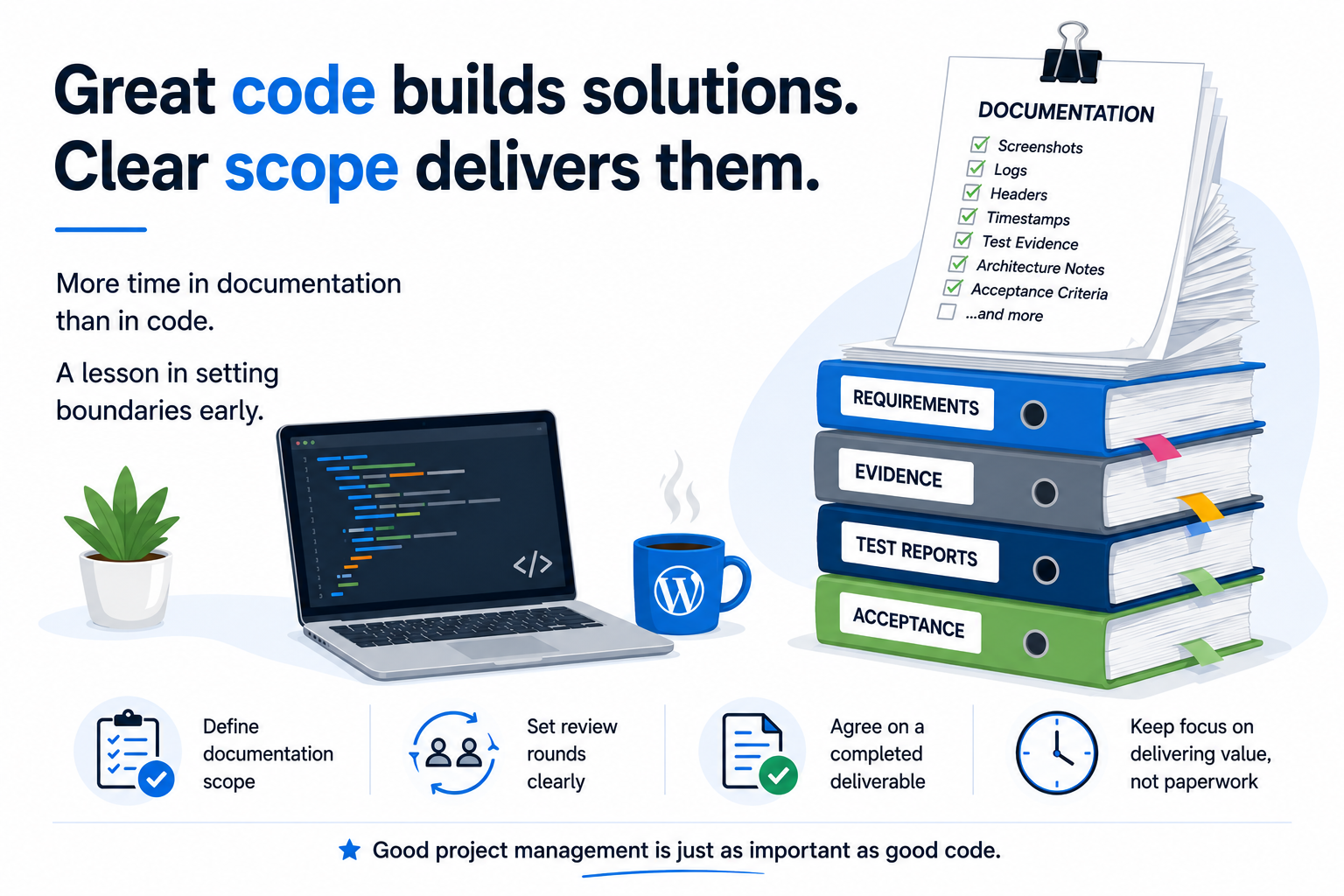
    The development work for a WordPress XML feed project was completed early, but the project became stuck in an endless documentation and evidence cycle. Every answer generated new requests for additional screenshots, logs, timestamps, headers, test evidence, architecture notes, and acceptance clarifications.

    Documentation is important. Good documentation protects both the client and the developer. But there is a point where documentation stops supporting delivery and starts replacing it.

    One lesson I’ve learned is to define documentation boundaries before development begins:
    • What evidence will be required for acceptance?
    • How many review rounds are included?
    • What constitutes a completed deliverable?
    • When does additional documentation become a separate milestone?

    As developers, we often assume that once the software works, we’re almost finished. In reality, some projects can spend more time in review than in implementation.

    Going forward, I’ll be including documentation scope and acceptance criteria as part of every proposal. It helps keep expectations clear, protects project timelines, and ensures both sides stay focused on delivering value rather than creating endless paperwork.

    Every project teaches something. This one reinforced that good project management is just as important as good code.

    #WordPress #SoftwareDevelopment #Freelancing #XML #API #ProjectManagement #Documentation #WebDevelopment

  • Why Most Real Estate Websites Fail to Sync with Portals (And How to Fix It)

    Why Most Real Estate Websites Fail to Sync with Portals (And How to Fix It)

    If you’ve ever tried syncing your real estate website with property portals, you already know—it sounds simple, but turns messy fast.

    Here’s the reality 👇

    The Problem:
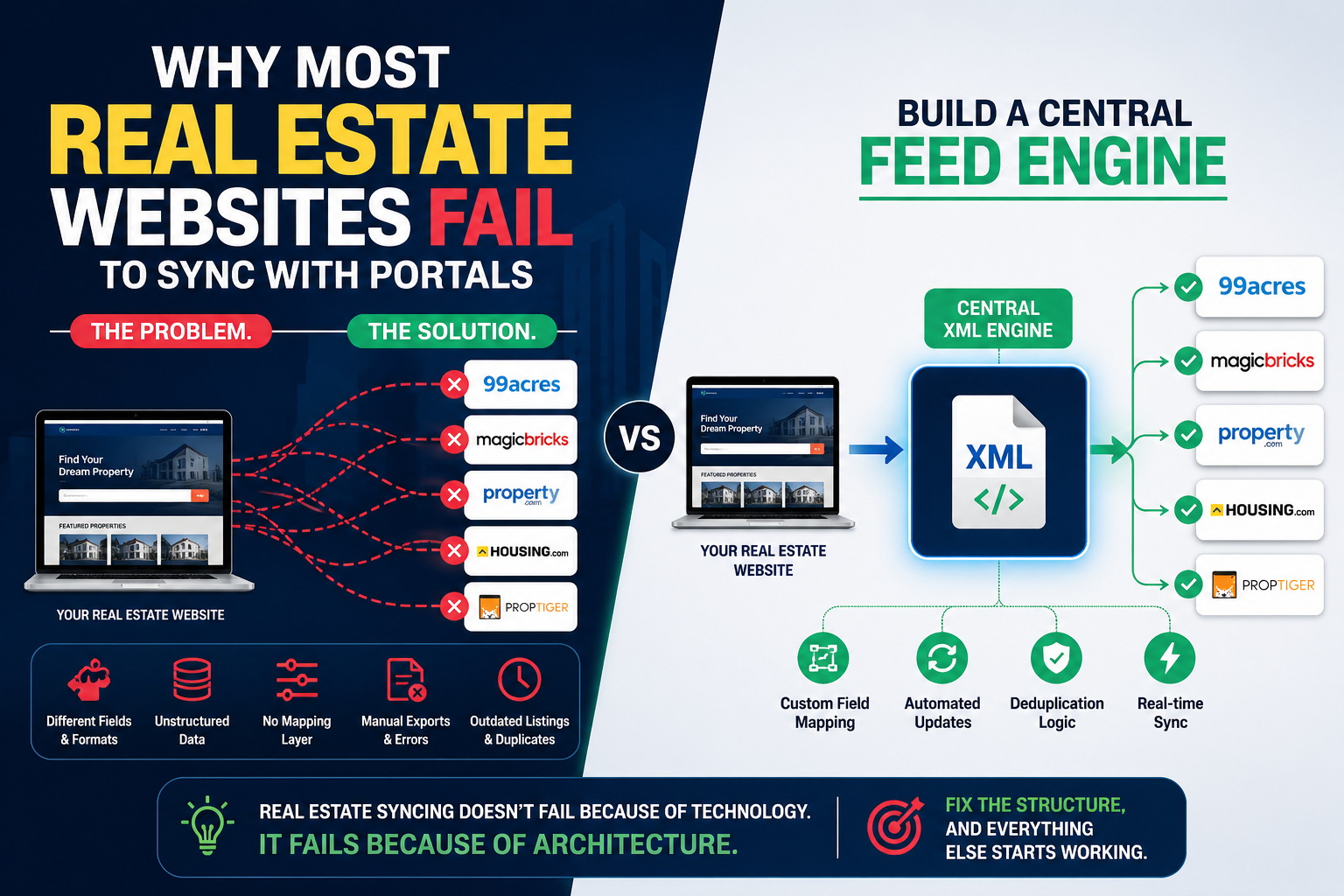
    Most real estate websites fail to sync properly because of fragmented data and inconsistent structures.

    • Every portal has different field names, formats, and requirements
    • Property data inside WordPress (or any CMS) is often unstructured
    • No centralized mapping layer exists
    • Manual exports = errors, delays, and missed listings
    • Duplicate or outdated properties confuse portals

    Result? ❌ Rejected feeds, ❌ missing listings, ❌ lost leads


    The Core Issue (What nobody tells you):
    You’re trying to connect multiple systems directly without a translation layer.

    That’s like speaking 5 languages without a translator.


    The Solution: Build a Central Feed Engine

    Instead of creating separate feeds for each portal, you need:

    ✅ A single unified XML layer
    → One source of truth for all your listings

    ✅ Custom field mapping system
    → Translate your data into each portal’s required format

    ✅ Automation + dynamic updates
    → No manual exports, everything updates in real-time

    ✅ Deduplication logic
    → Clean, consistent, portal-ready data


    The Smart Approach:
    👉 Website → Central XML Engine → Multiple Portals

    Not
    ❌ Website → Portal 1
    ❌ Website → Portal 2
    ❌ Website → Portal 3


    Bottom Line:
    Real estate syncing doesn’t fail because of technology.
    It fails because of architecture.

    Fix the structure, and everything else starts working.


    If you’re dealing with feed issues or portal rejections, this is exactly where the problem lies.

    Want help building a clean, scalable feed system? Let’s talk.

    https://www.fiverr.com/s/DBPwZoV

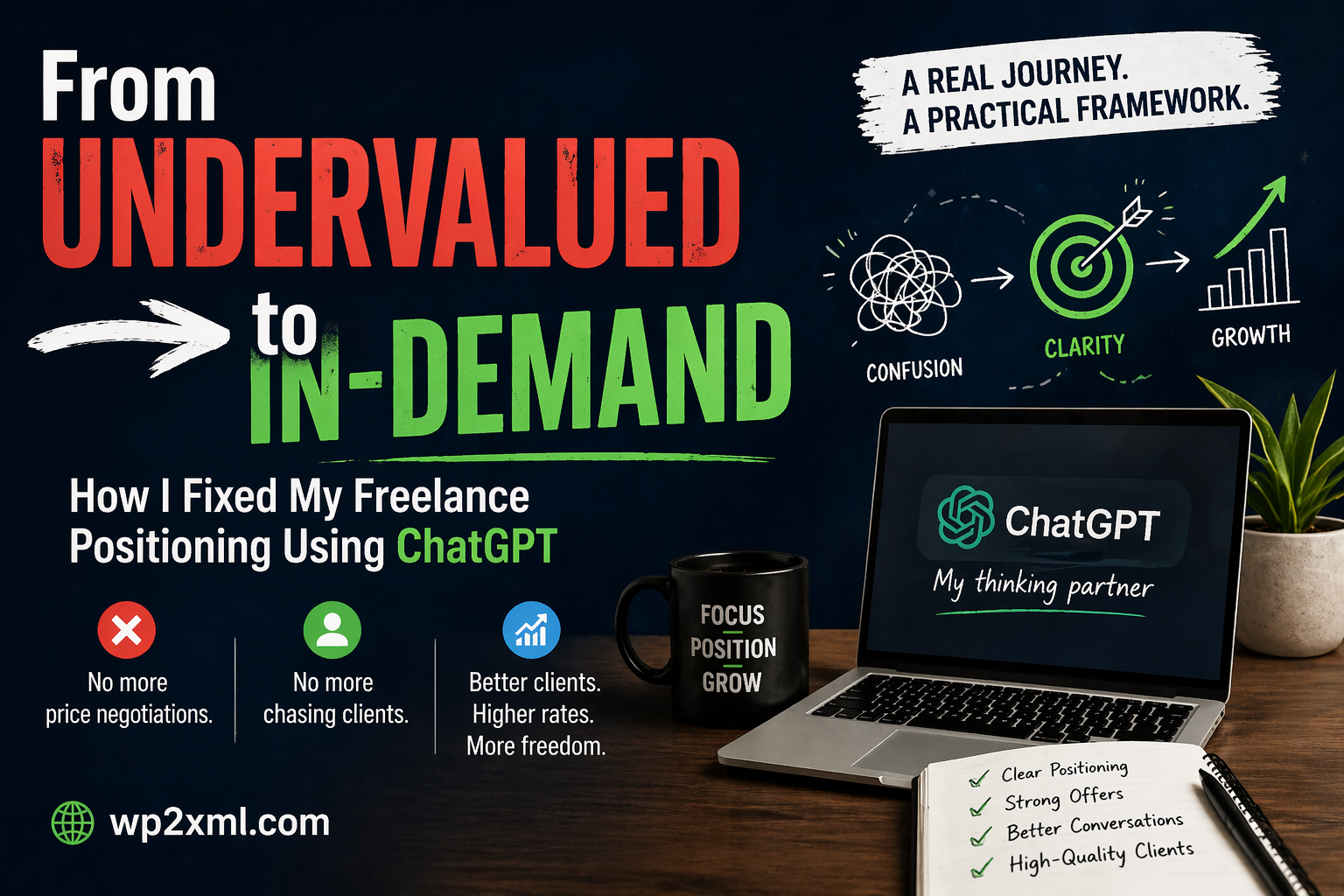
  • From Undervalued to In-Demand: How I Fixed My Freelance Positioning Using ChatGPT

    From Undervalued to In-Demand: How I Fixed My Freelance Positioning Using ChatGPT

    When I started my journey as a freelancer, I believed that doing good work would be enough.

    It wasn’t.

    I was skilled. I delivered on time. Clients were satisfied.
    But something felt off — I was constantly negotiating, justifying my prices, and chasing clients who saw me as “just another option.”

    If you’re a freelancer, you probably know this feeling.

    The Real Problem Wasn’t My Skill — It Was My Positioning

    For a long time, I thought:

    • “Maybe I need to lower my price.”
    • “Maybe I need more clients.”
    • “Maybe I need to work harder.”

    But none of these addressed the core issue.

    The real problem was how I was presenting myself.

    I looked like a task executor, not a problem solver.

    So clients treated me accordingly:

    • Price-driven conversations
    • Low commitment
    • Delayed decisions
    • Ghosting

    The Turning Point: Rethinking My Approach

    Instead of trying to get more clients, I started focusing on:

    How I communicate value before the work even begins.

    That’s when I began using ChatGPT — not as a shortcut, but as a thinking partner.

    Not for writing random content…
    But for refining clarity.

    What I Changed (And Why It Worked)

    1. From “What I Do” → To “What Problem I Solve”

    Before:

    “I create XML/RSS feeds for WordPress.”

    After:

    “I build structured feed systems that ensure your data is consistently distributed across platforms without breaking.”

    Same work. Completely different perception.

    Clients don’t buy services — they buy outcomes and reliability.


    2. Structured Offers Instead of Loose Conversations

    Earlier, my proposals were reactive:

    • Answering questions
    • Adjusting scope on the fly
    • Letting clients lead the conversation

    Now, every offer is structured:

    • Clear scope
    • Defined outcomes
    • Boundaries on revisions
    • Positioning based on stability, not effort

    ChatGPT helped me simulate client objections and refine responses until they felt solid and confident.


    3. Handling Price Conversations Differently

    Before:

    • I explained why my price is fair

    Now:

    • I explain what happens if the work is done wrong

    This subtle shift changes everything.

    Instead of:

    “This costs $500 because it takes time…”

    I say:

    “This approach ensures your feeds don’t break when your data structure changes — which is the main issue most setups fail at.”

    Now the conversation is about risk, not hours.


    4. Better Follow-Ups (Without Sounding Desperate)

    Earlier follow-ups:

    “Just checking if you had a chance to review…”

    Now:

    “Happy to proceed once you’re ready — the structure is already defined, so we can move quickly without reworking the scope.”

    It communicates:

    • Stability
    • Confidence
    • No pressure

    This alone improved response rates significantly.


    5. Thinking Like a System, Not a Freelancer

    This was the biggest shift.

    Instead of asking:

    • “How do I get this client?”

    I started asking:

    • “How do I make this decision easier for the client?”

    ChatGPT helped me break down conversations into:

    • Decision friction
    • Perceived risk
    • Clarity gaps

    Once I fixed those, conversions improved naturally.

    The Results

    After applying these changes:

    • Fewer negotiations
    • Better-quality clients
    • Higher acceptance rates
    • Less time wasted on unqualified leads

    Most importantly:
    I stopped feeling like I had to “convince” clients.

    What Most Freelancers Get Wrong

    They try to:

    • Compete on price
    • Add more features
    • Respond faster

    But ignore:

    • Positioning
    • Clarity
    • Perceived expertise

    Clients don’t evaluate you deeply — they interpret signals.

    If your communication feels uncertain, they assume your work is too.

    How You Can Start Fixing This

    You don’t need a complete overhaul.

    Start with this:

    1. Rewrite your service in terms of outcome, not task
    2. Structure your offers clearly (scope, timeline, boundaries)
    3. Anticipate client doubts before they ask
    4. Replace explanations with positioning
    5. Use ChatGPT to refine — not replace — your thinking

    Final Thought

    ChatGPT didn’t make me a better freelancer.

    It made me a clearer thinker.

    And clarity is what clients actually pay for.


    If you’re struggling with pricing, client quality, or constant negotiation — it’s probably not your skill.

    It’s how your value is being perceived.

    Fix that, and everything else starts to move.


    — Ranjit Singh
    wp2xml.com

  • How to earn money by learning XML

    That’s a great question — and a smart one, because XML (Extensible Markup Language) may sound old-fashioned, but it still powers a lot of data exchange across industries. Let’s go step by step on how you can actually earn money by learning XML — both directly and indirectly.


    💡 1. Understand What XML Is Used For

    XML is mainly used to store and share structured data between systems — websites, apps, APIs, and software platforms.
    Once you understand it deeply, you can earn by working on projects that involve:

    • Data feeds (like property listings, product catalogs, job listings, ads)
    • Software integrations (connecting one app to another)
    • Content syndication (sending or receiving structured data)
    • Custom web tools or WordPress plugins

    💼 2. Real Ways to Earn Money with XML

    (a) Freelancing / Service Work

    Offer services on platforms like Upwork, Fiverr, Freelancer:

    • Convert data between XML and CSV/JSON
    • Create XML feeds for eCommerce, real estate, or job portals
    • Modify or validate XML for integrations
    • Create WordPress/XML-related plugins or scripts

    👉 Example: “I will create an XML feed for your real estate listings website for ₹2,000”
    You can easily automate it once, and then sell repeatedly.


    (b) WordPress Plugin or Tool Development

    You already mentioned your plugin — “WordPress to XML Feed”.
    That’s a perfect XML-based business idea.
    You can:

    • Sell Pro versions (add more export options)
    • Offer custom feed setup services
    • Create affiliate program or tutorials teaching others to earn using your plugin

    (c) XML + API Integration Projects

    Many websites use XML APIs (e.g., property portals, job boards, vehicle listings).
    You can charge clients to:

    • Fetch data from external XML APIs and display it on their sites
    • Push their site data to third-party services using XML feeds

    💰 These projects can earn ₹5,000–₹50,000 depending on complexity.


    (d) Teach XML or Create Courses

    If you understand XML and WordPress integration, you can:

    • Create a YouTube channel (“XML for WordPress Developers”)
    • Write an eBook or blog (“How to create XML feeds for real estate websites”)
    • Sell courses on Udemy, Skillshare, or Gumroad

    (e) Data Management or Tech Jobs

    XML is still common in:

    • Banking and finance systems (data exchange)
    • Government data services
    • Medical and publishing industries (standardized data formats)

    Roles like:

    • Data integration specialist
    • API developer
    • XML/XSLT engineer
      often pay ₹6–15 LPA (in India) or $60k+ abroad.

    🧠 3. What to Learn Next

    To really earn from XML, combine it with these:

    SkillWhy
    XSLT / XPathFor transforming and filtering XML data
    PHP or PythonFor automating XML feeds
    WordPressTo integrate with plugins or themes
    APIs / REST / JSONTo handle modern integrations
    Hosting & automation toolsTo deploy or sell your XML tools easily

    🚀 Example Plan for You

    Since you already make a WordPress plugin:

    1. Learn advanced XML and XSLT (for powerful feed customization).
    2. Offer a service: “I’ll create XML feeds for your property or job portal.”
    3. Add a paid version of your plugin with feed templates.
    4. Teach others (YouTube or blog) — and monetize traffic.